A table read is one of the best ways to hear whether a script works, but it usually means gathering a cast and a room. TableRead turns a Final Draft (.fdx) script into a table read. Upload a script, give each character a voice from a catalog of 145 built-in voices, and play it back scene by scene. Click any line to start from there.
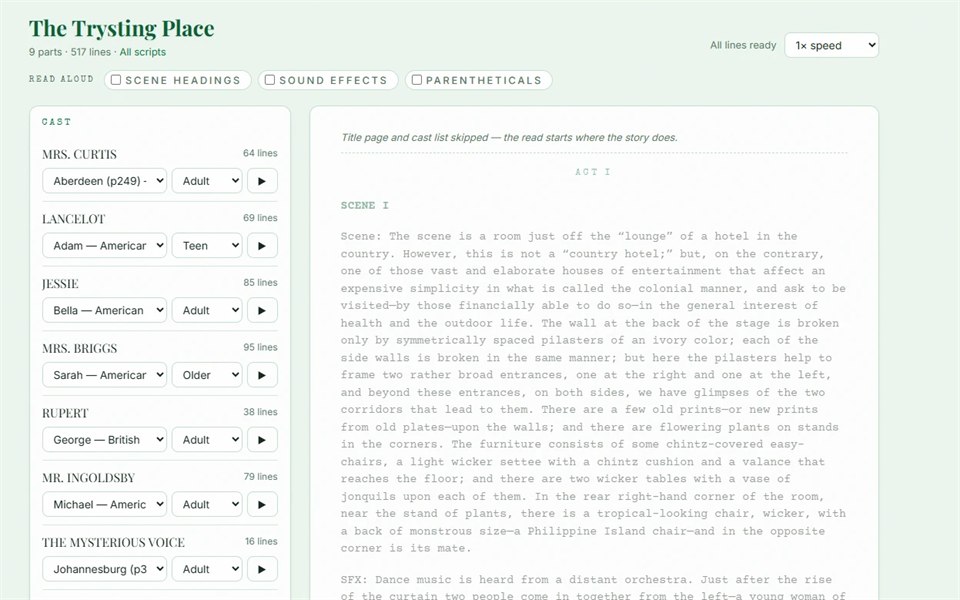
Cast yourself as a part in rehearsal mode and playback pauses long enough for you to read those lines aloud. Scene headings, action, sound cues and parentheticals are read too. Transitions are shown on screen but not spoken.
TableRead is a generic, customizable version of the table read tool we use for our own productions. If your writing group, company or studio wants the same thing, it can be set up for your scripts.
Highlights
- Reads scene headings, action, character cues, dialogue, parentheticals, transitions and dual dialogue
- Voices with accents from Scottish and Irish to Australian and Indian English
- An age setting for each character, from child to elderly
- Rehearsal mode: read one part yourself while the rest of the cast is voiced
- Each line is rendered once and cached, so replays and recasting stay fast
- Private by default: you see only the scripts you upload
Who it’s for
Screenwriters, playwrights and audio drama writers who want to hear a script before they read it aloud.